Problem-Solving Women's Gadgets Gifts: 2026 Practical Picks
Skip the gimmicks. Discover practical women's gadgets gifts for 2026 that solve real daily friction points, from ergonomic tech to smart sleep.


The market for tech gifts is saturated with novelty items that end up in a junk drawer by February. When searching for the best women's gadgets gifts, the highest-impact choices are not the flashiest—they are the ones that eliminate daily friction. A truly practical gift anticipates a recurring annoyance and solves it seamlessly. For 2026, the most thoughtful tech gifts focus on ergonomic health, sleep optimization, and on-the-go efficiency.
This guide bypasses generic smart home gadgets and focuses strictly on problem-solving hardware. Every recommendation below is selected based on a specific daily pain point, backed by exact technical specifications, current pricing, and real-world utility.
Temperature Fatigue: The Commuter's Coffee Problem
Standard insulated travel mugs rely on passive vacuum sealing. They keep liquids hot for a few hours, but the temperature steadily degrades, and the initial pour is often scalding before dropping to lukewarm. For women with long commutes or fragmented morning routines, coffee or tea is rarely consumed at the ideal temperature.
The Solution: Ember Travel Mug 2+
The Ember Travel Mug 2+ (currently retailing around $199.95) utilizes an active heating element and a dual lithium-ion battery system to maintain a precise liquid temperature. Unlike its predecessors, the 2+ model features a 3-hour battery life off the charging coaster and an auto-sleep feature that activates when the mug is empty, preserving battery life.
- Target Temperature Range: 120°F to 145°F (adjustable via the Ember app in 1-degree increments).
- Capacity: 12 oz (355 ml), optimized for standard single or double espresso shots with milk.
- Material: Stainless steel interior with a ceramic-coated drinking rim to prevent metallic taste transfer.
Repetitive Strain: The Home Office Ergonomics Crisis
With hybrid work models cemented in 2026, repetitive strain injuries (RSIs) like carpal tunnel syndrome remain a leading cause of workplace discomfort. According to the Mayo Clinic, prolonged wrist extension and awkward hand positioning during mouse usage compress the median nerve, leading to numbness and weakness.

The Solution: Logitech Lift Vertical Ergonomic Mouse
Standard mice force the forearm into pronation (palm down), which crosses the radius and ulna bones and creates muscular tension. The Logitech Lift ($79.99) positions the hand at a 57-degree natural handshake angle, eliminating bone crossover and reducing muscular strain in the shoulder and forearm.
| Feature | Logitech Lift (Vertical) | Standard Premium Mouse |
|---|---|---|
| Hand Position | 57-degree neutral tilt | Flat pronation (0 degrees) |
| Click Noise | SilentTouch (>90% noise reduction) | Standard mechanical click |
| Form Factor | Optimized for small-to-medium hands | One-size-fits-all palm rest |
| Battery Life | Up to 24 months (1x AA) | 70-90 days (rechargeable) |
Buying Nuance: The Lift is specifically engineered for small to medium hand sizes (typically measuring under 19cm from wrist crease to middle finger tip). For larger hands, the Logitech MX Vertical is the appropriate alternative, though it costs roughly $20 more and lacks the silent click mechanism.
Circadian Disruption: The Groggy Morning Protocol
Abrupt auditory alarms trigger a cortisol spike, pulling the brain out of deep sleep or REM cycles and causing sleep inertia—that heavy, disoriented feeling that can last up to two hours after waking. The CDC's sleep hygiene guidelines emphasize the importance of consistent, gradual wake routines to maintain circadian alignment.
The Solution: Hatch Restore 3
The Hatch Restore 3 ($129.99) replaces jarring phone alarms with a gradual, light-based wake protocol. It simulates a sunrise by incrementally increasing light intensity over a customizable 10 to 30-minute window before the optional audio chime begins.
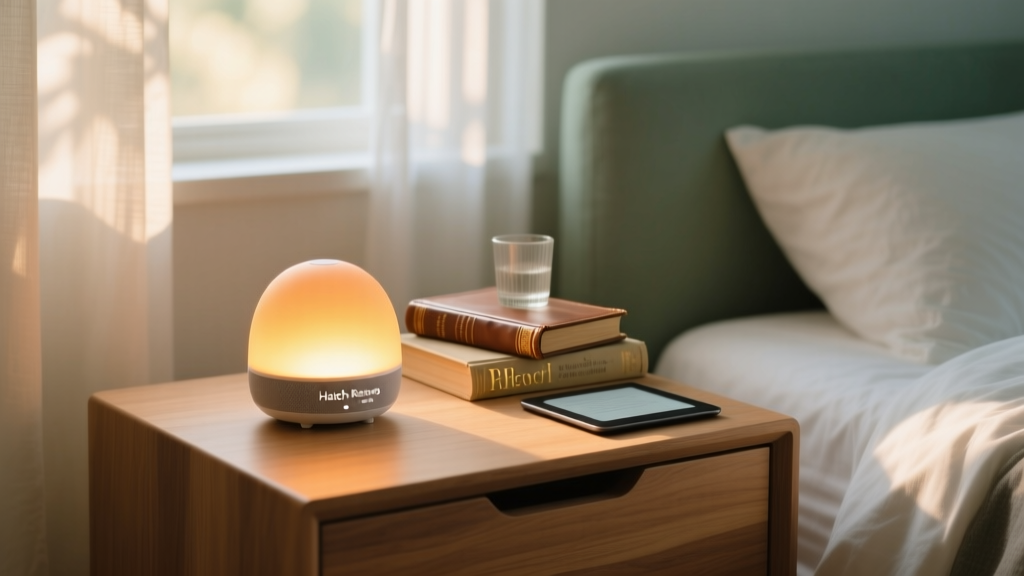
- Light Spectrum: The Restore 3 utilizes a warm, amber-hued LED array that avoids the blue light wavelengths known to suppress melatonin production during the wind-down phase.
- Audio Profiles: Includes 12 built-in sleep sounds (like rain and white noise) and 5 gentle wake sounds (like birdsong and soft chimes).
- Smart Integration: Syncs with Apple Health and Fitbit to adjust wake times based on your actual sleep stages, ensuring the light begins during a lighter sleep phase.
The Friction Mapping Framework: How to Choose
Do not buy a gadget based on its Amazon rating. Buy it based on her specific daily friction points. Use this 3-step decision framework to select the right problem-solving gift:
- Audit the Complaints: Listen for recurring micro-complaints over a two-week period. 'My coffee is always cold by the time I get to my desk' points to the Ember. 'My wrist aches after Zoom calls' points to the Logitech Lift. 'I hate the sound of my morning alarm' points to the Hatch.
- Evaluate the Setup Cost: A practical gift should not require her to overhaul her existing routine. The best gadgets integrate into her current environment. The Lift requires only a Bluetooth pairing; the Ember requires a single app download. Avoid gifts that demand complex installation or subscription fees (unless the subscription is pre-paid by you).
- Check the Form Factor: Tech must match her aesthetic and physical space. If her desk is minimalist and clutter-free, avoid gadgets with sprawling docking stations or excessive LED indicators. The 2026 trend in practical tech is 'invisible design'—hardware that looks like premium home decor rather than a piece of IT equipment.
By shifting the focus from 'what is the newest tech' to 'what is the most annoying daily problem,' you transform a simple gadget into a highly personalized, deeply appreciated tool that she will use every single day.
Written by
Nina PetrovaNina Petrova holds a Master's degree in Child Development from the Erikson Institute and a B.S. in Nursing from the University of Illinois at Chicago. She worked as a pediatric nurse for 6 years before transitioning to family technology consulting, bringing clinical rigor to her evaluations of kid-friendly gadgets, educational toys, and parental control software. Nina has reviewed over 400 children's tech products, testing each for safety compliance (CPSC and ASTM standards), developmental appropriateness across age groups, screen-time impact, and data privacy practices. She serves on the Children's Technology Review advisory board and has testified before the FTC on children's data protection in connected toys. Her reviews are trusted by parents and educators alike for their evidence-based approach to balancing technology benefits with child safety.